Connect Tesla Wall Connector with ChargeDoc
Track your charging costs with the Tesla Wall Connector Gen 3 automatically. Local WiFi connection, no authentication needed — works with any EV.
| Modeller | Gen 3 |
| Integrasjon | Lokalt WiFi |
| Autentisering | None (open) |
| Maks. effekt | 22 kW |
| Faser | 3-faset |
| Marked | Global |
| API-kvalitet | Begrenset |
| Status | Tilgjengelig |
Tesla Wall Connector in Europe
The Tesla Wall Connector Gen 3 is available in Europe with a Type 2 connector and charges not only Tesla vehicles, but any electric car that supports the European Type 2 standard. With up to 22 kW charging power (three-phase), it's a powerful wallbox for home use.
Whether you drive a Tesla Model 3, a VW ID.4, a Hyundai Ioniq 5, or a BMW i4 — the Wall Connector charges them all, and ChargeDoc documents the costs.
Simplest setup of all wallboxes
The Tesla Wall Connector makes it especially easy: No registration, no cloud account, no API key, no authentication. The Wall Connector provides two HTTP endpoints on the local WiFi that are freely accessible:
/api/1/vitals— Real-time data: voltage, current per phase, grid frequency, session energy, vehicle status/api/1/lifetime— Lifetime statistics: total energy in Wh, number of charge starts, uptime
Setup:
- Connect your smartphone to the WiFi
- Open ChargeDoc
- Wall Connector is automatically detected
- Done — monitoring is running
No password to remember, no API key to generate, no OAuth login page.
What ChargeDoc captures
For every completed charging session, the app documents:
- Energy charged in kWh (from
session_energy_whor lifetime energy delta) - Calculated electricity costs based on your individual rate
- Charging duration of the session in seconds
- Grid voltage and current per phase (when vitals available)
- Total energy since commissioning (from
energy_wh) - Charge starts — how often your car has been charged in total
The app calculates current charging power from voltage × current across all three phases — so you know exactly how many kW are flowing.
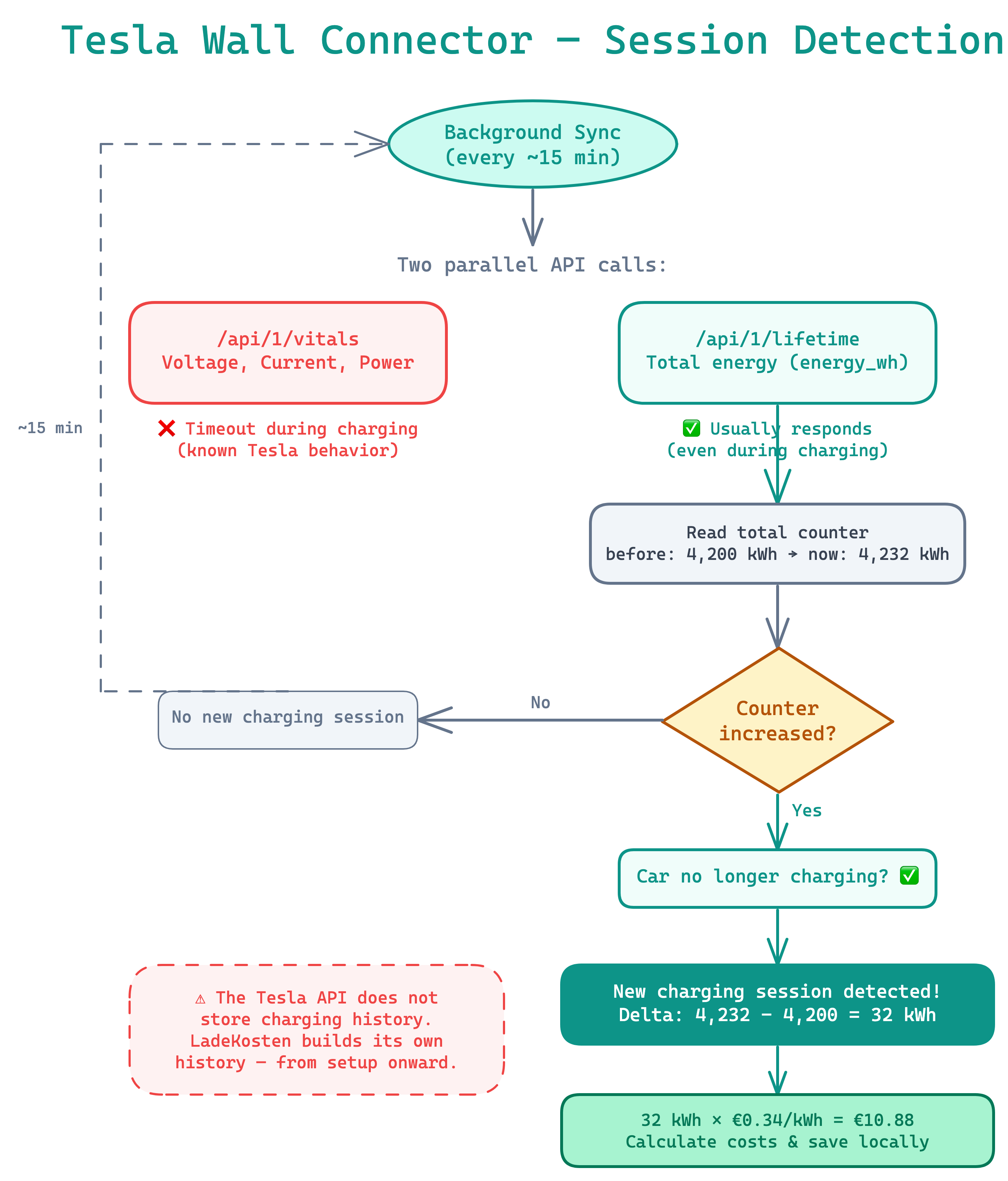
How ChargeDoc detects your charging sessions
Honest about the limitations
Transparency matters to us. The Tesla Wall Connector has some quirks:
API doesn't always respond during charging
The /api/1/vitals endpoint can become unreachable during active charging — this is known Tesla Wall Connector behavior. ChargeDoc handles this gracefully: if vitals doesn't respond, the app uses the lifetime data as a fallback. Recording of the completed charging session is unaffected.
No session history
The Wall Connector doesn't store charging history in its API. ChargeDoc compensates by calculating the difference in the lifetime energy counter between two polls. From the moment of setup, every charging session is documented without gaps.
Read-only and no authentication
The API is read-only — ChargeDoc cannot control the Wall Connector. The lack of authentication means any device on the same WiFi can read the data. For a private home network, this is generally not an issue.
Maximum privacy
All communication happens locally on your WiFi. Your charging data never leaves your home network:
- No Tesla account needed — completely independent from Tesla services
- No cloud service — everything works offline
- No third-party servers — your data stays private
- No tracking mechanisms in the communication
Document charging costs for tax
Even with the Tesla Wall Connector, ChargeDoc creates tax-ready documentation:
- PDF reports for your employer
- DATEV export for your tax advisor
- GoBD-compliant records with audit log
- Monthly overviews with costs and energy amounts
For company car drivers and freelancers who charge their Tesla Wall Connector at home, this is the easiest way to document charging costs.
Conclusion
The Tesla Wall Connector Gen 3 is one of the most popular wallboxes worldwide — and with ChargeDoc you document your charging costs automatically. Simplest setup without any authentication, works with any EV (not just Tesla), and maximum privacy through purely local communication. The Tesla API limitations are known and handled gracefully by ChargeDoc.
Slik setter du det opp
Connect to the same WiFi
Make sure your smartphone and your Tesla Wall Connector Gen 3 are on the same WiFi network.
Detect wallbox automatically
Open ChargeDoc and start the search. The app finds your Tesla Wall Connector on the local network — no password or API key needed.
Start monitoring
Tap on your Wall Connector and confirm. From now on, all charging sessions are automatically captured after completion.
Ofte stilte spørsmål
Which generation of the Tesla Wall Connector is supported?
ChargeDoc supports the Tesla Wall Connector Gen 3. It provides a local HTTP API over WiFi with the endpoints /api/1/vitals and /api/1/lifetime. Older generations without WiFi are not supported.
Does it work in Europe with Type 2 connector?
Yes. The Tesla Wall Connector Gen 3 is available in Europe with a Type 2 connector and charges any EV that supports this standard — not just Tesla. Whether VW ID.4, BMW iX, Hyundai Ioniq 5 or Mercedes EQA: ChargeDoc captures charging data regardless of vehicle manufacturer.
Can I see charging power during an active session?
The Tesla Wall Connector's local API has a known limitation: the /api/1/vitals endpoint may not respond during active charging. ChargeDoc detects this and uses the lifetime data (/api/1/lifetime) as a fallback. Recording of the completed charging session still works reliably.
What are the limitations?
The API is read-only (no controlling the wallbox), there's no authentication (any device on the WiFi can read), no session history (ChargeDoc builds its own), and limited live data during charging. For the core function — documenting charging costs — this is perfectly sufficient.
Do I need a Tesla account?
No. The connection runs completely locally over your WiFi. No Tesla account, no cloud service, no registration needed.
How do I see my Tesla Wall Connector charging history?
The Tesla app only shows Wall Connector history when the charger is paired with your Tesla account — limited to the last 12 months, with manual CSV download. ChargeDoc builds its own permanent session history on your device: every charge with kWh, duration, and costs at your electricity rate — for any EV, not just Tesla.
Can I export the Wall Connector charging history for taxes or reimbursement?
Yes. ChargeDoc turns your Wall Connector sessions into ready-made reports — e.g. tax documentation or an employer reimbursement summary — with per-session details, monthly totals, and your price per kWh.
Begynn å registrere ladekostnader nå
Prøv ChargeDoc gratis i 14 dager og registrer ladekostnadene dine automatisk.