Connect go-e Charger with ChargeDoc
Track your charging costs with any go-e Charger automatically — via local WiFi or go-e Cloud API. All models with API v2 are supported.
| Modeller | Home, Gemini, Gemini flex, HOME+, PRO |
| Integration | WiFi + Cloud |
| Autentisering | Local HTTP + Cloud API |
| Max. effekt | 11/22 kW |
| Faser | 3-fasig |
| Marknad | DACH |
| API-kvalitet | Stabil |
| Status | Tillgänglig |
All go-e models — one adapter
The go-e Charger was the first wallbox ChargeDoc supported. The adapter is model-agnostic: it works with any go-e Charger running firmware version 052 or later with the HTTP API v2 enabled. This includes:
- go-e Charger Home — all revisions (11 kW and 22 kW)
- go-e Charger Gemini — the successor with a new design
- go-e Charger Gemini flex — the portable variant
- go-e Charger HOME+ — V3/V4 hardware
- go-e Charger PRO — the rugged variant for commercial and semi-public use (11 kW and 22 kW)
The local API is consistent across all models. If you switch models, ChargeDoc continues working immediately — no reconfiguration needed.
Two connection modes — you decide
💡 Recommendation for tax and business use: Enable cloud mode. It also captures charging sessions that happened while the app was closed or you were away from your home WiFi — the foundation for complete, gap-free records. Privacy-focused private users can choose local mode; every session running while the app is active on your home WiFi is fully detected there too.
Local WiFi mode
In local mode, ChargeDoc communicates directly with your go-e Charger via your home network. Your charger provides an HTTP interface at its IP address, which the app polls every 30 seconds:
- Charging status — idle, charging, waiting for release, complete
- Current charging power — per phase and total in watts (real-time)
- Energy of current session in Wh
- Total energy counter (ETO) since commissioning
- Phase-specific data — voltage, current, and power per phase
- RFID card assignment — which card is currently active
- Firmware version and error codes
No cloud account needed. No API key. Not a single byte of data leaves your home network.
go-e Cloud mode
For users who want to monitor charging costs remotely — and for anyone who needs complete, gap-free records — ChargeDoc offers cloud mode. The connection runs via https://{serial}.api.v3.go-e.io with your personal API key as a bearer token.
- Access from anywhere — not just on home WiFi
- Automatic background sync — approximately every 15 minutes via iOS BGTaskScheduler
- ✨ Automatic import of historical sessions via the go-e Cloud's
dllCSV endpoint — including charges that happened while the app was closed or you were away from your home WiFi - API key from the go-e app — under Internet > Advanced Settings
For the German market (GoBD/DATEV): imported entries are locked for audit-proof immutability (corrections only via reversal), each import carries a SHA-256 receipt fingerprint, and DATEV voucher numbers follow the stable LK-YYYYMM-NNNNN format (gapless per month, stable across re-exports).
Requirement: Firmware >= 052 and Cloud HTTP API must be enabled in the go-e app.
You can switch between both modes at any time.
Setting up your go-e — step by step
We connected our own go-e Charger PRO in ChargeDoc in under a minute. Here's how — whether you go local or cloud:
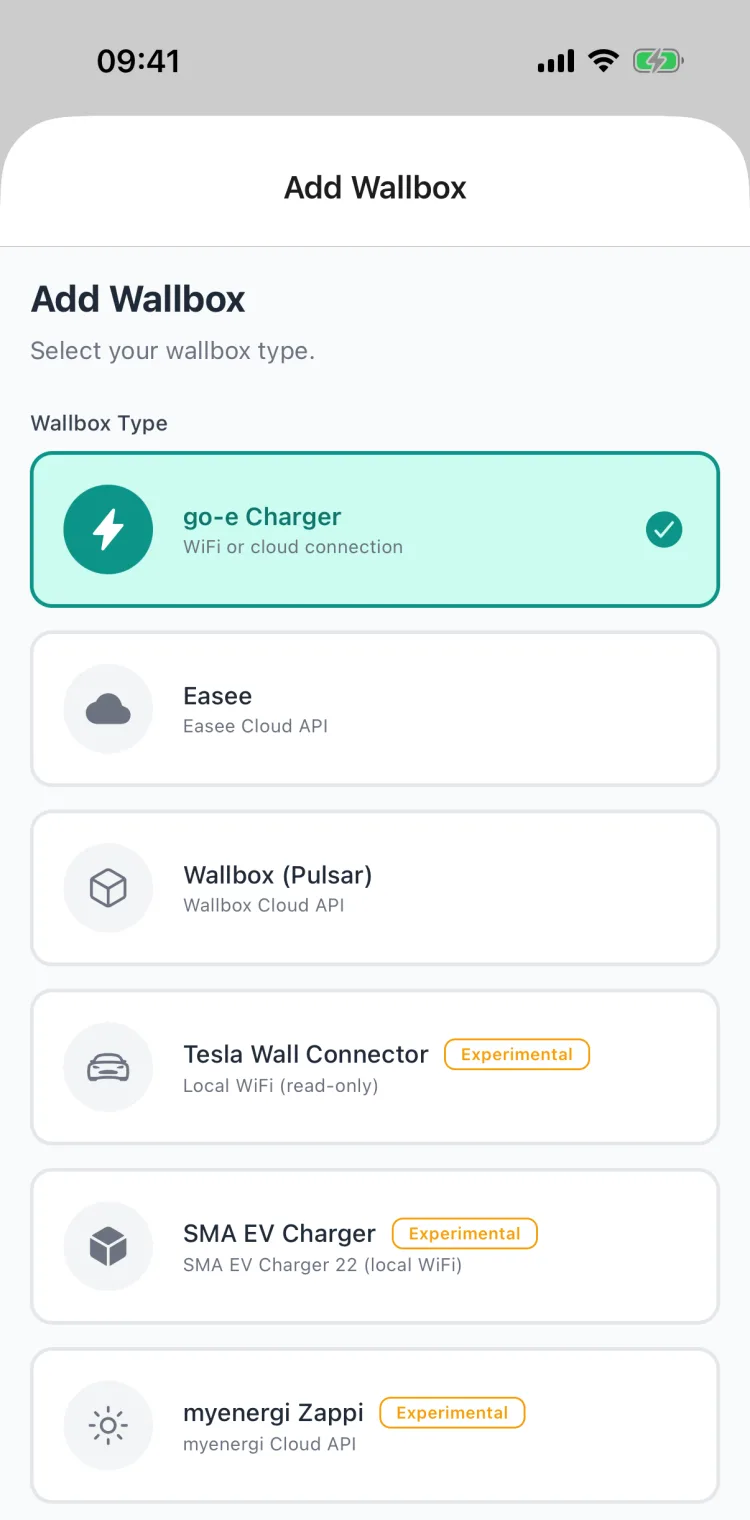
1. Choose the wallbox type
Open More → My Wallboxes → Add and select "go-e Charger".
2. Enter the connection details
Give it a name and pick the connection mode. You can switch anytime later.
Local WiFi — for real-time data and maximum privacy. Enter your go-e's IP address ("Search network" usually finds it automatically; otherwise it's in the go-e app under Internet). The local password is optional and enables live updates over WebSocket.
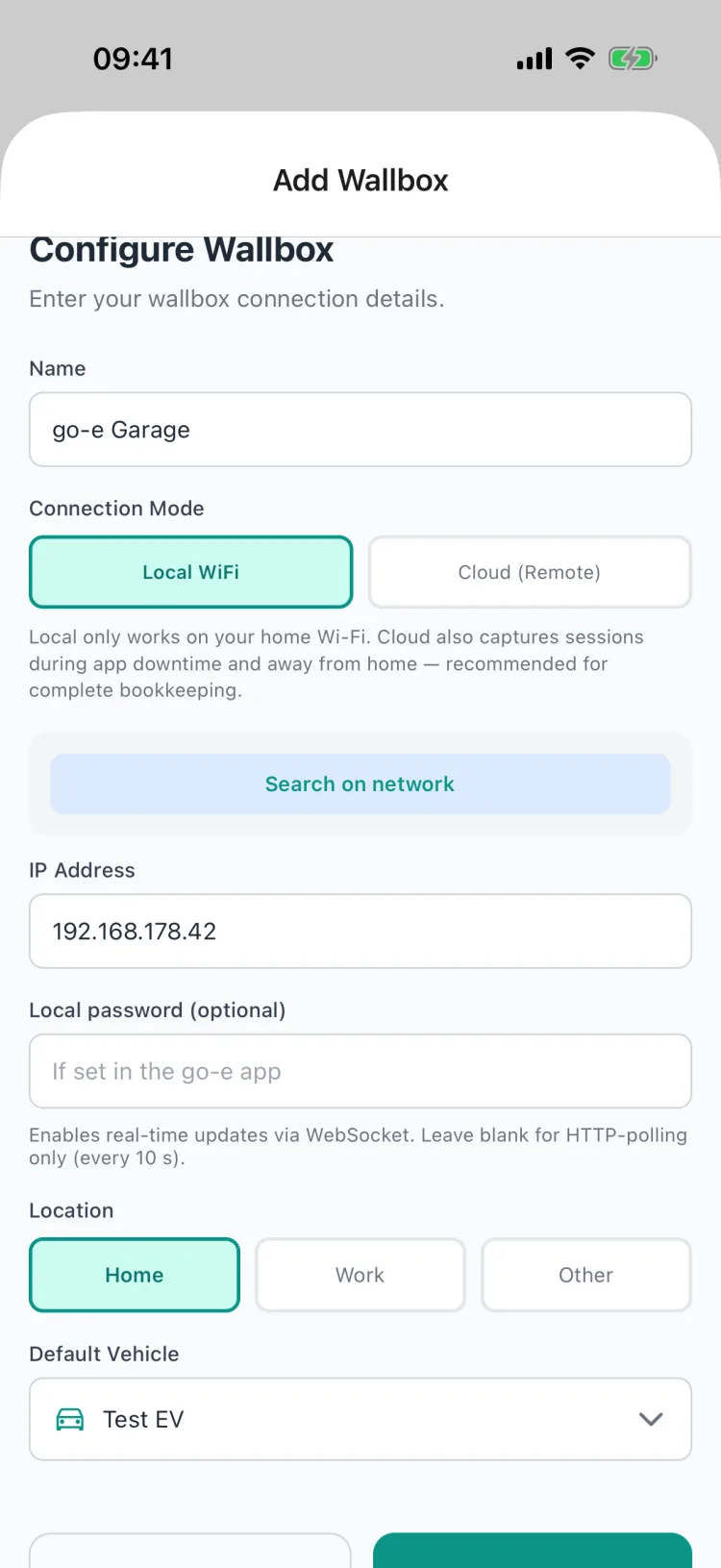
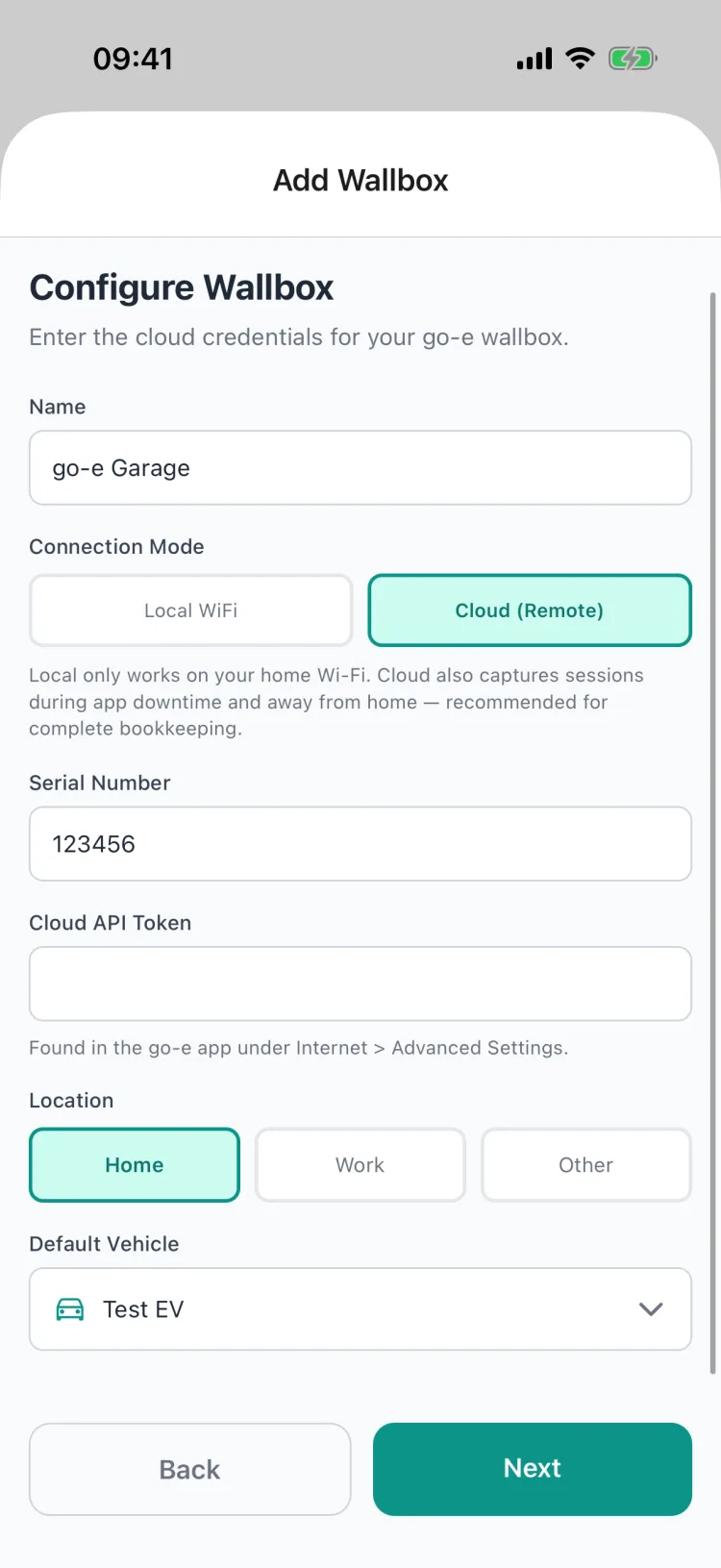
Cloud (remote access) — for access on the go and complete, audit-proof records. Enter the serial number and Cloud API Token (in the go-e app under Internet → Advanced Settings).
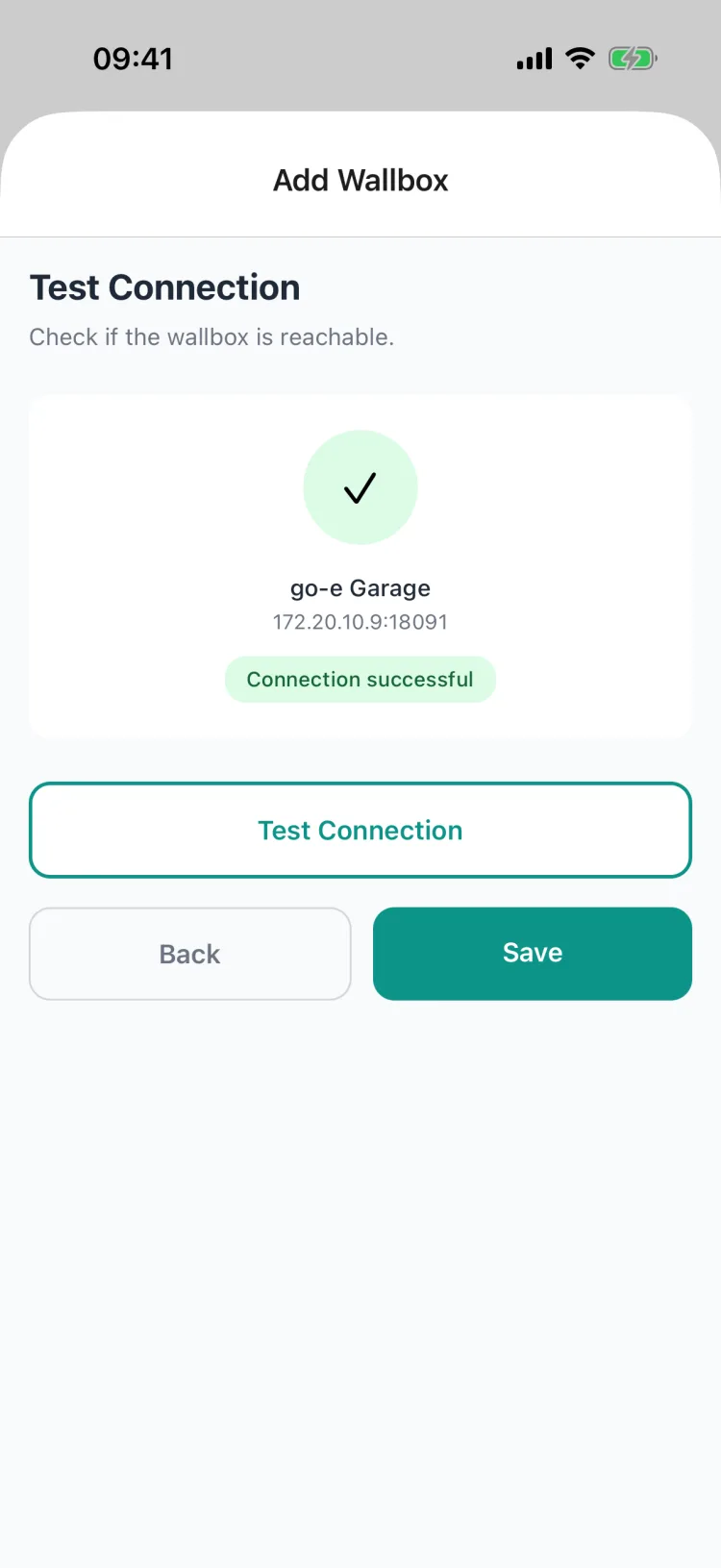
3. Test the connection
Tap Test connection. When the green checkmark with "Connection successful" appears, tap Save.
4. Done — live status
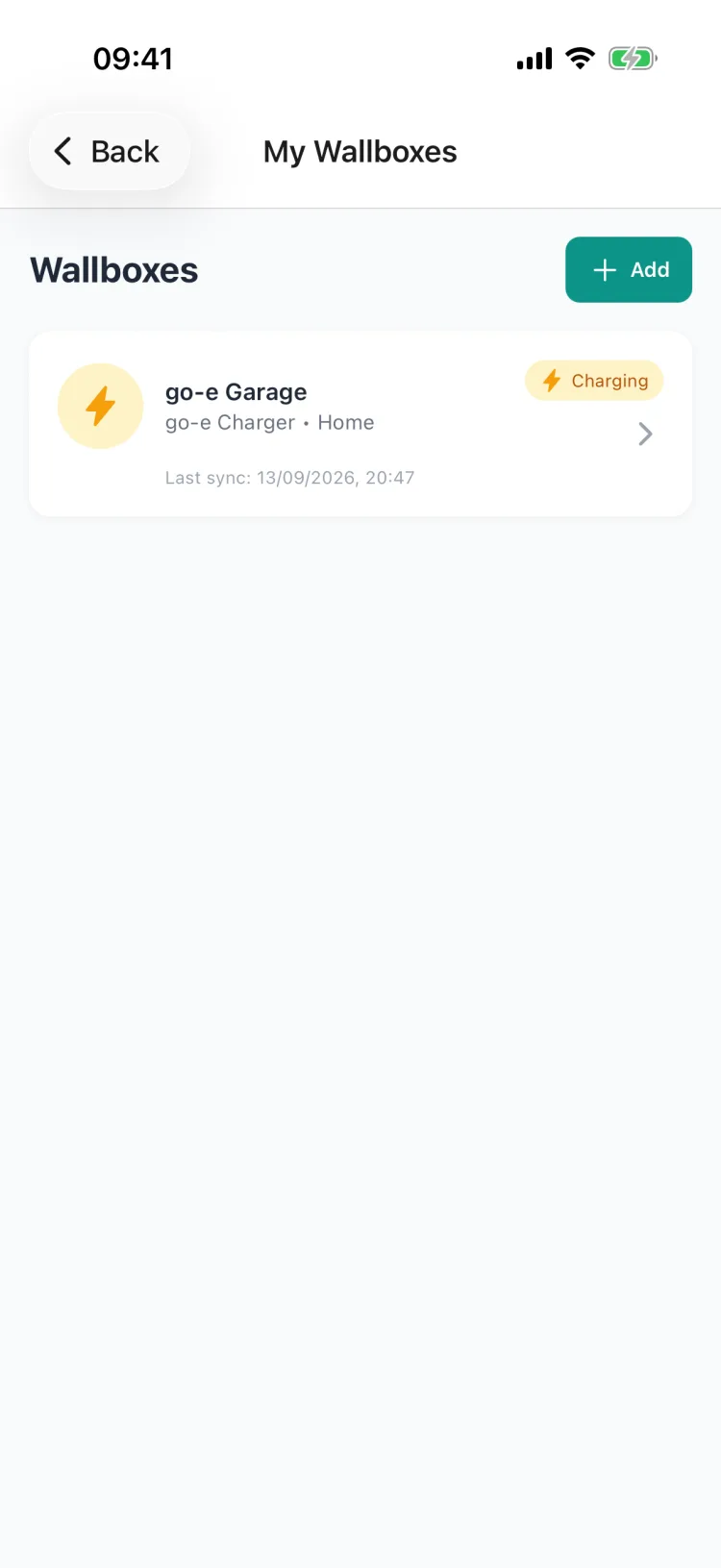
Your go-e appears in your wallbox list. During a charging session it shows the "Charging" status and when it last synced.
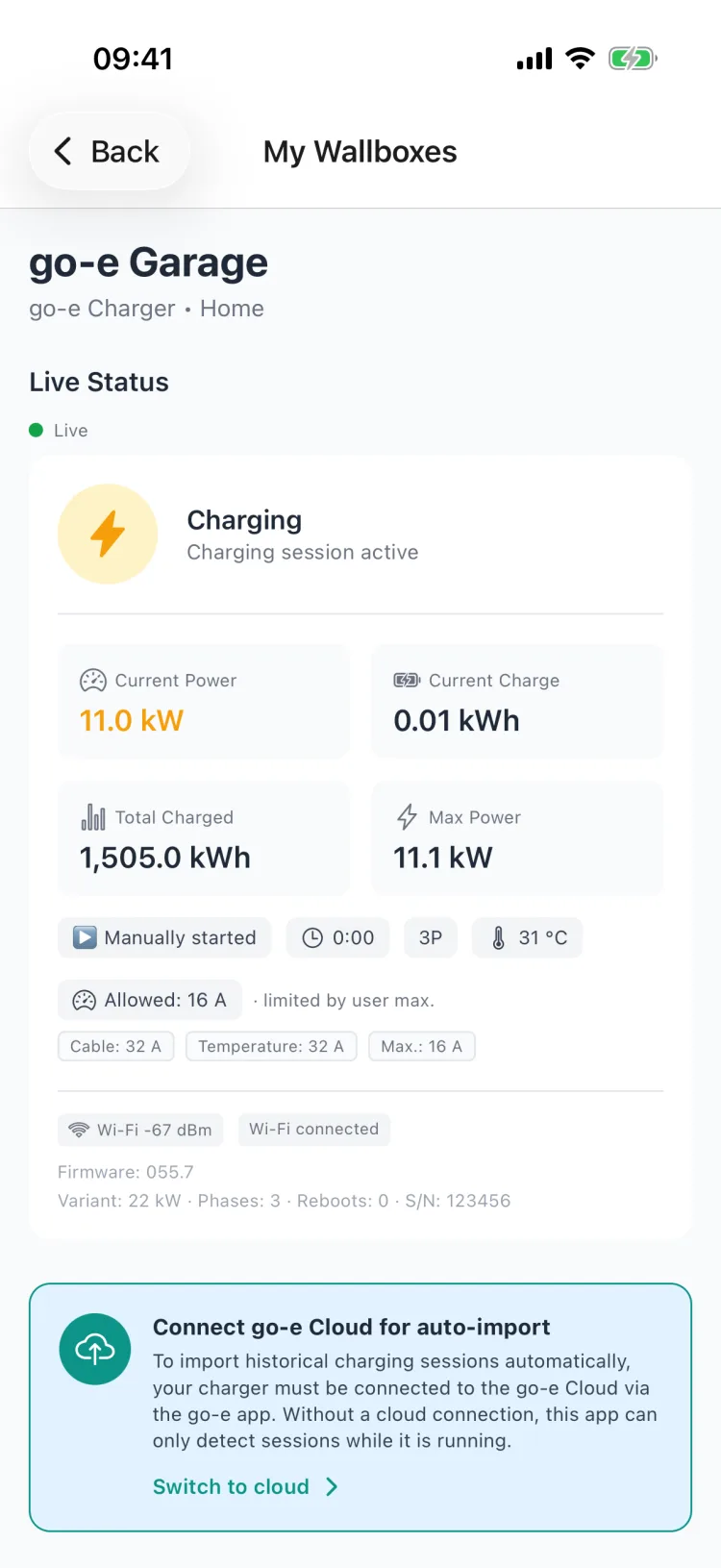
Tap it to see the full live status: current charging power, energy charged, phases, temperature, charging allowance and more.
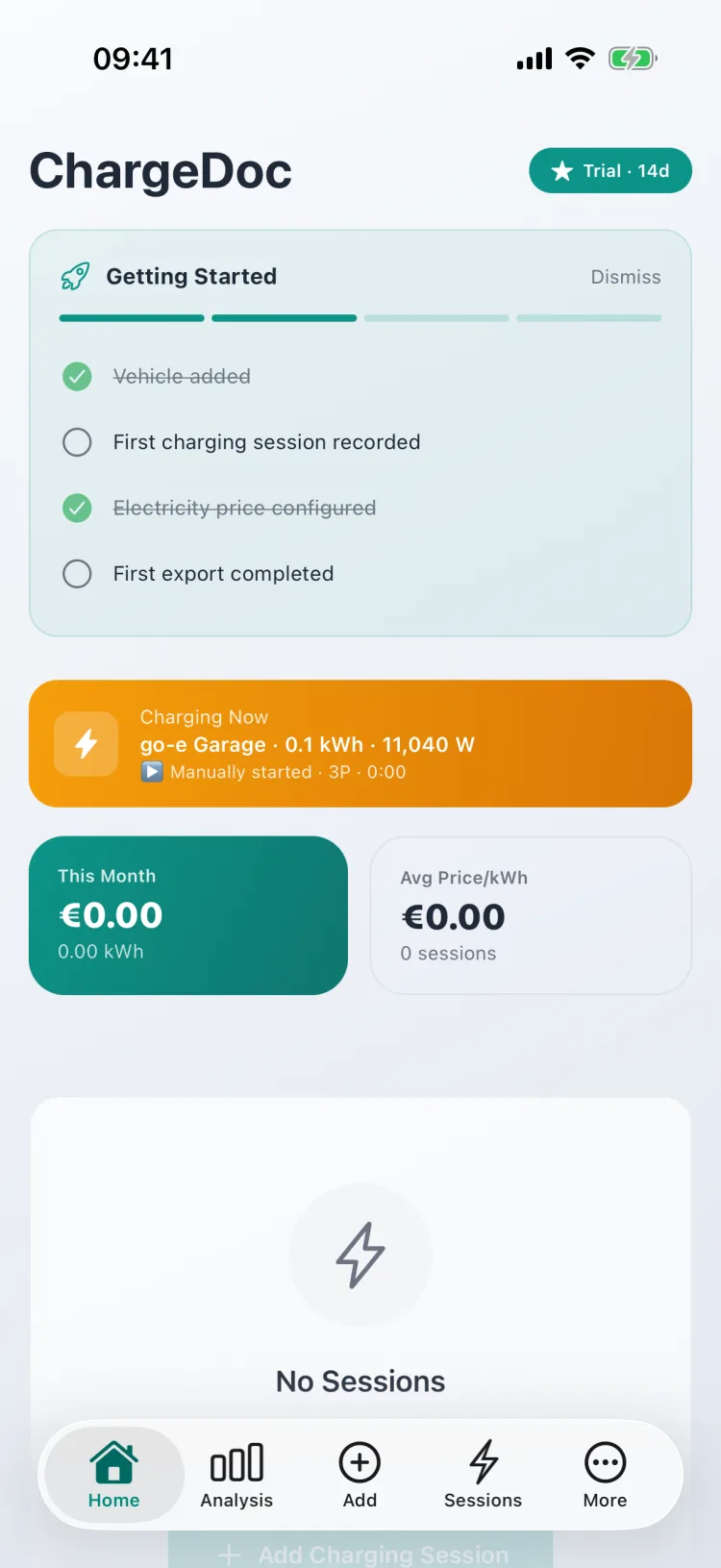
Your dashboard also shows a live banner during an active session — at a glance, without opening the wallbox list.
Intelligent session detection
Since the go-e API doesn't provide session history, ChargeDoc uses a multi-level detection system:
Primary: Timestamp-based
The app monitors the lccfc (lastCarStateChangedFromCharging) field. When this value changes between polling cycles, a charging session has completed. Exact start and end times are calculated from boot-relative timestamps (rbt). Energy is primarily taken from the RFID card counter (c0e-c9e).
Fallback: Total counter delta
When timestamp fields aren't available (older firmware), the app compares the total energy counter (ETO) between polls. An increase of at least 0.1 kWh with charging stopped is recognized as a new session.
Recovery: Missed sessions
If the app wasn't opened between two charging sessions, ChargeDoc detects via the ETO delta on next launch that a session occurred, and creates a retroactive entry.
Safety rules: Minimum 0.1 kWh (prevents standby false positives), maximum 200 kWh (plausibility check), negative deltas are ignored.
RFID cards: assign every charge to the right vehicle automatically
This is the feature that makes go-e shine in a multi-car household. Your go-e Charger supports up to 10 RFID cards — and ChargeDoc turns them into automatic vehicle detection.
How it works: In the wallbox detail, open "RFID vehicle detection" → "Refresh cards". ChargeDoc reads every card stored on the charger, including its name (here "Default", "Business", "Family"), and shows a dropdown per card. Assign each card to a vehicle once and tap Save.
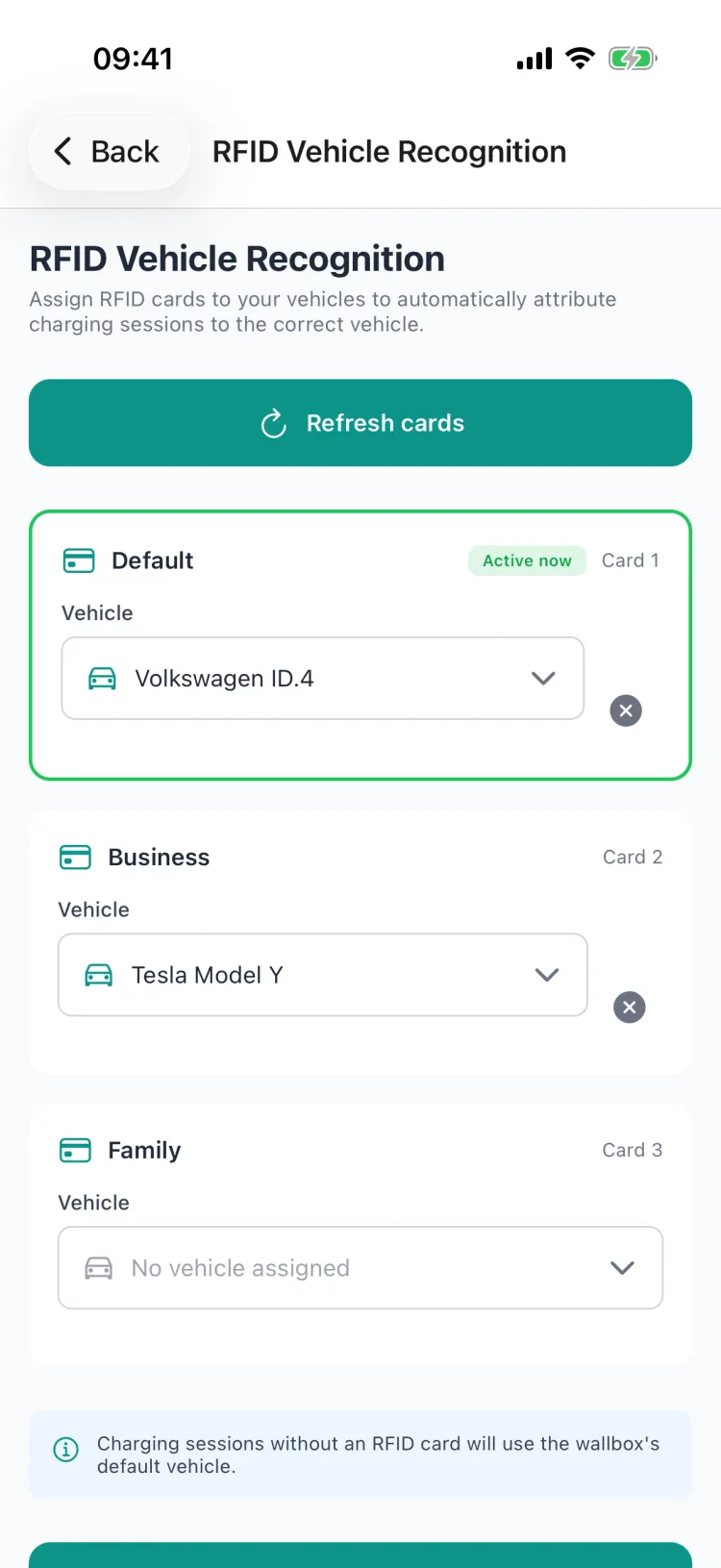
From then on it's fully automatic: whoever plugs in their car and holds their own card to the charger has that charging session automatically attributed to the correct vehicle — with accurate costs, separated per car. Ideal for a family with two EVs or a mixed fleet of private and company cars.
A few details:
- "Active now" marks the card currently charging — you can see at a glance which car is plugged in.
- Cards you don't assign are no problem: those sessions fall back to the wallbox's default vehicle.
- ChargeDoc also reads the cumulative energy counter per card (
c0e-c9e) — the basis for separate per-vehicle accounting.
What the app captures
For every charging session, ChargeDoc documents:
- Date and time (start and end)
- Energy charged in kWh (precise to two decimal places)
- Calculated electricity costs based on your rate
- Charging duration from start to finish
- Vehicle assignment via RFID card (if available)
- Source marked as "wallbox" (distinguishable from manual entries)
Electricity costs and tax
Enter your electricity price per kWh once, and ChargeDoc automatically calculates the cost of every session. Have a dynamic tariff like Tibber or Octopus Energy? You can adjust the price regularly.
For company car drivers and freelancers, ChargeDoc creates at the push of a button:
- PDF reports for your employer
- DATEV export for your tax advisor
- GoBD-compliant records with audit log
Privacy — your choice
In local WiFi mode, not a single byte of data leaves your home network. No cloud, no servers, no tracking IDs.
In cloud mode, data is retrieved via the go-e Cloud API. The API key is stored encrypted on your device. Only charging data is read — no personal information.
Conclusion
The go-e Charger is one of the most popular wallboxes in Germany and Austria — and with ChargeDoc you get the most out of it. Two connection modes, intelligent session detection, RFID support for multiple vehicles, and tax documentation. Download ChargeDoc and connect your go-e Charger in less than a minute.
Så ställer du in det
Choose connection mode
Open ChargeDoc and go to Settings > Wallbox > go-e Charger. Choose whether to connect via local WiFi or go-e Cloud API.
Connect your wallbox
In local mode: Make sure your phone is on the same WiFi — the app detects your go-e Charger automatically. In cloud mode: Enter your go-e Cloud API key (found in the go-e app under Internet > Advanced Settings).
Start automatic tracking
Confirm the connection — done. All charging sessions are now automatically captured, costs calculated, and assigned to the correct vehicle.
Vanliga frågor
Which go-e Charger models are supported?
All go-e Chargers with API v2 (firmware version 052+): go-e Charger Home (all revisions, 11 kW and 22 kW), go-e Charger Gemini, go-e Charger Gemini flex, go-e Charger HOME+ (V3/V4), and go-e Charger PRO (11/22 kW, commercial). The adapter is model-agnostic — as long as the local HTTP API or Cloud API is enabled, the connection works.
What's the difference between local and cloud mode?
In local mode, the app communicates directly via WiFi with your go-e Charger — in real-time, private, and offline-capable. In cloud mode, ChargeDoc connects through the go-e Cloud (HTTPS, with your API key). The key difference: only cloud mode imports historical charging sessions automatically — local mode only detects what happens while the app is active on your home WiFi. For complete, gap-free records we therefore recommend cloud mode.
Are charging sessions captured that happened while the app was closed?
Yes — if your go-e Charger is connected to the go-e Cloud and you've selected cloud mode in ChargeDoc. On the next sync the app automatically pulls every session that accumulated in the meantime from the go-e Cloud (via the dll CSV endpoint). In pure local mode, only sessions running while the app is active on your home WiFi are detected.
Does ChargeDoc work with go-e Charger offline?
Yes, in local WiFi mode. All communication runs through your local WiFi. In cloud mode, an internet connection is required.
How does the app detect completed charging sessions?
ChargeDoc uses intelligent status polling: the app detects the transition from 'charging' to 'finished' using timestamp fields from your go-e Charger. As a fallback, the total energy counter (ETO) delta is checked. This way, no charging session is lost — even if the app wasn't active in between.
Can I distinguish multiple vehicles with RFID cards?
Yes. Your go-e Charger supports up to 10 RFID cards. ChargeDoc assigns each card to a vehicle and automatically attributes charging sessions to the correct car — including separate energy counters per card.
How do I export my go-e Charger charging history?
The go-e app and portal offer a manual CSV download of your charging data. With ChargeDoc you don't need it: sessions are captured automatically, priced at your electricity rate, and exported as ready-made reports — for taxes, employer reimbursement, or your own records.
Börja registrera laddkostnader nu
Testa ChargeDoc gratis i 14 dagar och registrera dina laddkostnader automatiskt.